STATvault Request a demoDemo

Already a customer or driver? This page is for couriers looking at StatVault. Your sign-in is right here.

Medical courier software with proof at every handoff

When a clinic asks what happened to its specimen, have the answer.

StatVault brings dispatch, driver activity, pickup proof and delivery history together for medical couriers, with a driver app for Android and iPhone. Built inside a working dispatch office, with dispatcher and admin quality of life as the design rule. Keep CXT while your team adds the visibility and evidence it needs.

See what happened, spot what needs attention while the work is still happening, and give the clinic a clear answer.

Trying it opens a simulated courier you dispatch yourself: drivers on the road, orders coming in, a coach beside you. Nothing to install, no data to bring. A demo is a 30-minute screen share of the live system, walked through your own pickup-to-delivery workflow. No slides.

What it fixes

Three problems every courier owner recognizes.

StatVault is a full platform, but you do not buy a platform. You buy an answer to one of these. Start there; the rest is there when you want it.

“We cannot explain what happened at a pickup.”

A clinic says the box was empty. A lab says a bag never arrived. Today the answer is a phone call and a guess.

What we show you

  • NFC proof of pickup at the box
  • The custody timeline on the order
  • Where proof is missing, said plainly
See a pickup walked through →

“Dispatch spends the day chasing information, and drivers.”

Where is the driver, did the STAT get picked up, who is covering the 4 PM run. Every answer costs a call, and chasing drivers who do not pick up is the real hassle of the job. The quality-of-life upgrades below are built for exactly that.

What we show you

  • Live board and map on observed truth
  • Nudge, ack and broadcast: ask a driver, get an answer back
  • Zippy: ask, or tell it to act
See what dispatchers get →

“We struggle to verify charges and driver pay.”

Invoices go out on what was declared. Pay is argued over from memory. Nobody can point at the evidence.

What we show you

  • A verify queue for every order
  • Charge and pay lines with their records
  • Pay per lane and per driver
Ask for the billing walkthrough →
How it works

One pickup, start to finish, with the evidence showing.

An anonymized afternoon STAT. The record panels are illustrative; the screenshots are production screens with identifying details replaced. Notice what the record says when proof is missing, not only when it is there.

1

A pickup is expected

The order arrives from CXT or the customer portal: clinic, window, driver. That is the declared truth. StatVault keeps it exactly as given.

Illustrative pickup record
STAT · clinic drop → regional labWindow 1:30 – 2:30 PM Assigned driver[DRIVER] Proof expectedNFC tap · photo · signature
2

The driver records what is there

One tap on the box tag with the phone they already carry, Android or iPhone: that proves the phone was at that tag at that time. A photo shows what was in the bag. A thermometer in the cooler reports through the same phone, and each reading is judged against the profile that specimen needs; a crossing raises an alert. The app keeps all of it in an outbox until the server has it, so a dead spot does not lose the tap.

Illustrative pickup record
2:08 PM · arrived inside geofenceGPS
2:11 PM · phone read the box tag, matched to orderNFC
2:12 PM · photo, two bagsPhoto
2:12 PM · cooler thermometer read at the box, inside the refrigerated profileTemp
3:02 PM · read again at delivery, still inside profileTemp
3

Dispatch sees the real status, and the gap

The board shows picked up because the box was tapped, not because someone typed it. On the next stop the driver forgot the tap. The record does not pretend; it says so, and dispatch can act while the driver is still there. Watch that moment below.

Illustrative pickup record
This order · pickupNFC verified
Next stop · completed 2:41 PMNFC scan missing
Dispatchsees both, on the same row
4

Weeks later, someone asks

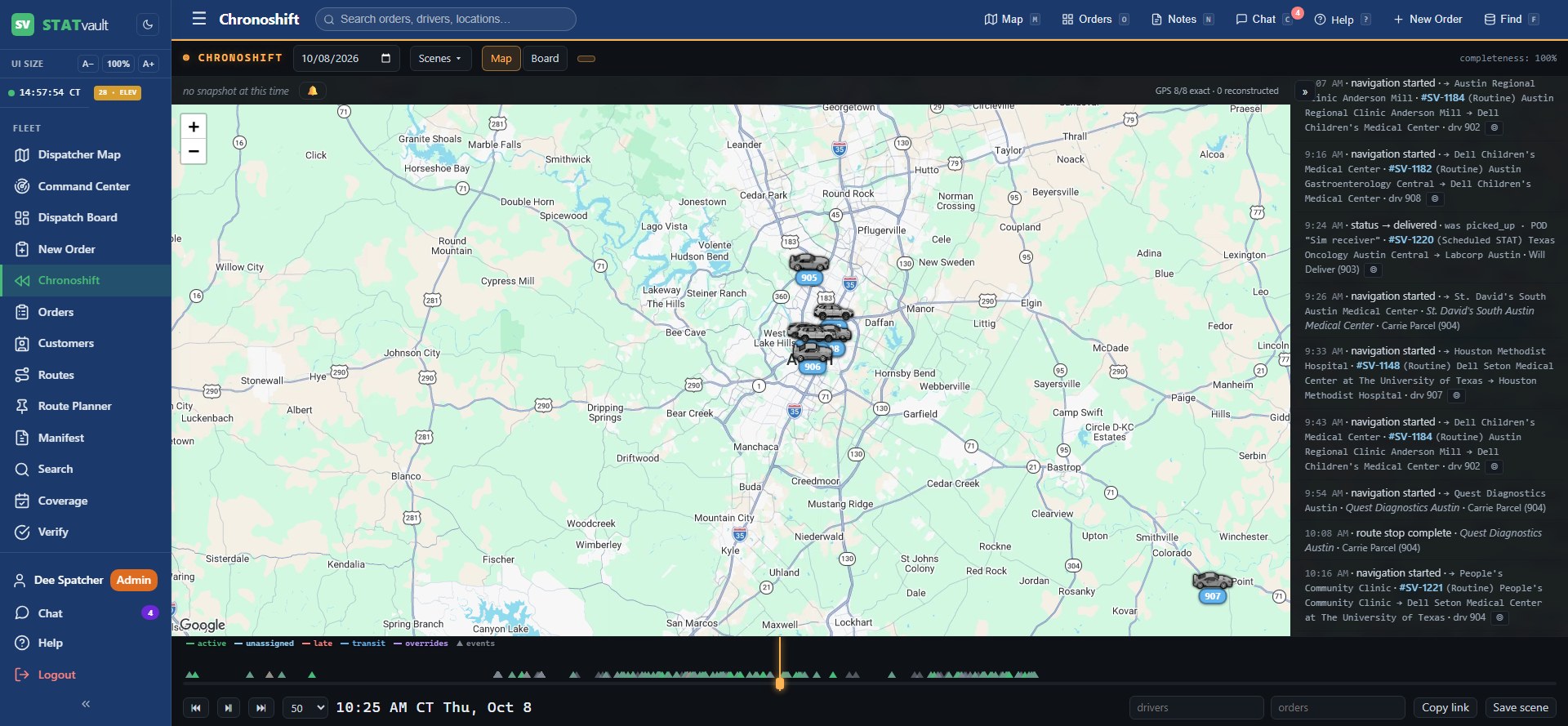
The lab calls about that afternoon. You open the order and press play. Arrival, tap, photo, delivery, signature, in order, each event chained to the one before it. The answer takes a minute, not a day of phone logs.

statvault.tech/chronoshiftProduction, details replaced
Chronoshift: film-room replay of the fleet with a scrubbing timeline transport

What the record will not do

It will not invent a tap that did not happen, and it will not let a later edit overwrite what the field reported. A missing tap stays missing, visibly. And it will not overclaim: a tap proves a phone was at a tag at a time; it does not by itself prove which specimens were in the bag. That is what the photo, the piece count and the signature are for, and the record keeps each one as its own fact.

Problems we solve

The calls a courier owner never wants to get.

Instant dispatch for medical couriers, even after hoursOrders that land overnight get a driver the moment they arrive, under plain-English rules an admin has explicitly turned on.
Stop missed specimen pickups with SmartBox and NFC proofAt pickup points with a SmartBox, missed pickups went to zero.
Medical courier audit trail that settles delivery disputesWhen a lab says it never arrived, answer from the record instead of from memory.
Stop specimens going to the wrong labDispatch is warned while the driver is still there, and sends the right lab in one click.
Alternatives to legacy medical courier softwareWhat couriers complain about most, and what changes without a rip-out.
How to choose medical courier software: a checklistA ten-point checklist, and the questions to ask any vendor.
Keep CXT

Nothing to rip out. Here is exactly what changes.

StatVault reads the CXT feed without spending API credits and pushes every driver action back, so your order numbers, your customers and your invoicing stay where they are. Read works with CXT.

Starting without a TMS? StatVault takes orders directly through the customer portal and its own order entry, and runs billing and pay on its own engine. The steps are the same, minus the connection.

  1. What you provideYour CXT connection details and a driver roster. We set up the feed and the first customer accounts with you on a call.
  2. What dispatchers seeA live board and map beside the CXT screens they already use. Nothing they do in CXT breaks; what drivers do in the app appears in both.
  3. What drivers installOne app, Android or iPhone. Their phone reads the box tags; no extra hardware to carry.
  4. What day one looks likeThe live board and map light up from your CXT feed before a single driver installs anything. The first driver with the app shows up on the map, dispatch nudges them from it, and the answer comes back on screen. Pickup proof starts the day the tags go on the boxes.
  5. SupportA direct line to the people who built it and run it in a working courier operation every day.
In production

Built inside a working courier, not for a pitch deck.

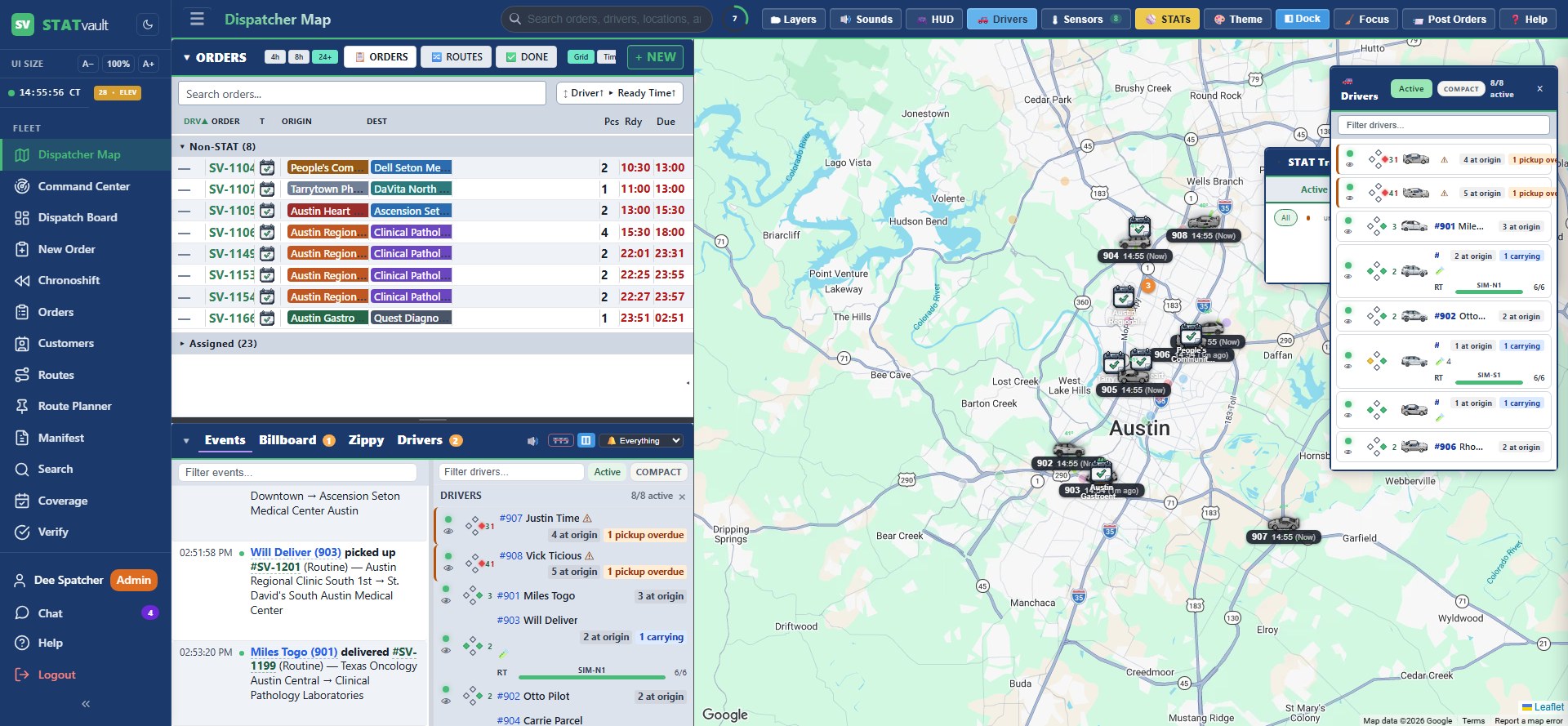
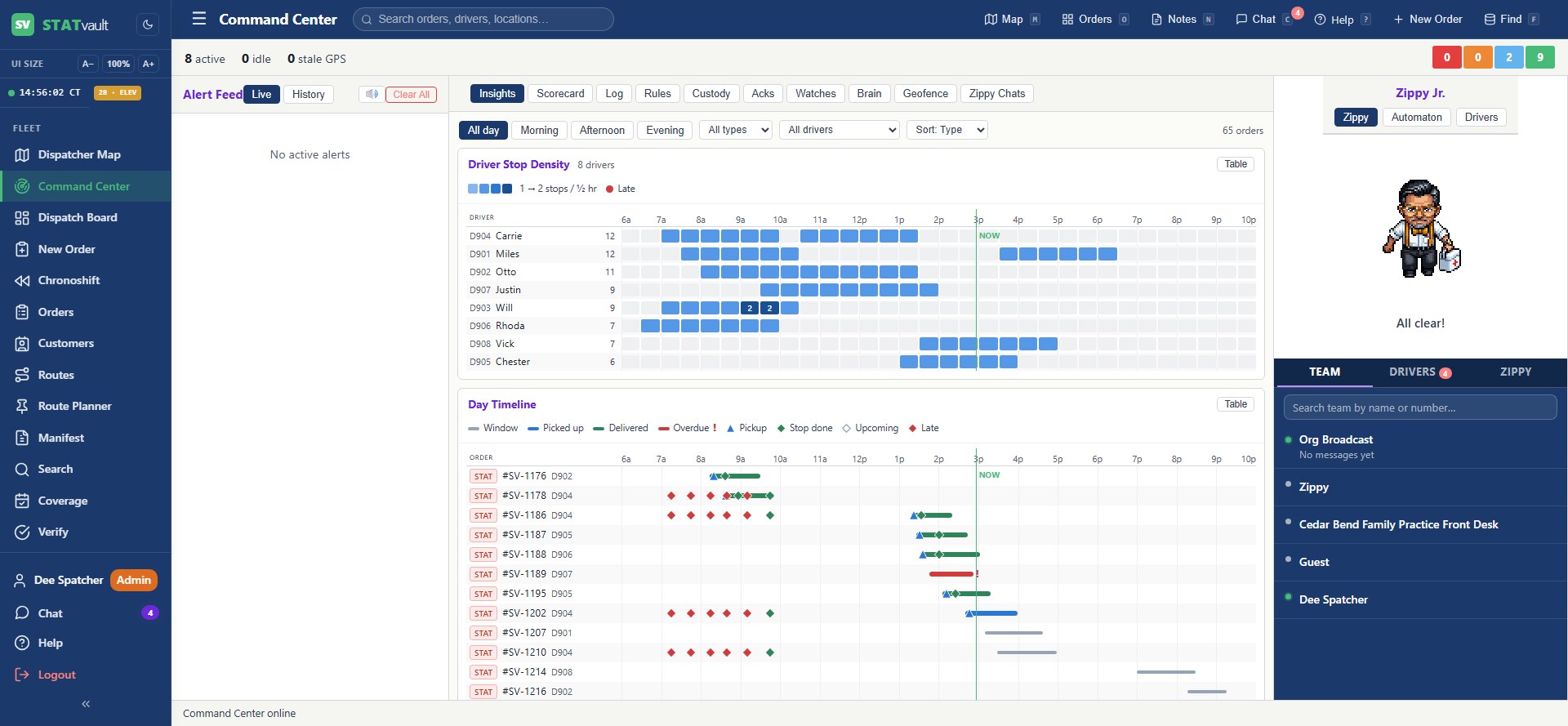
These are the screens a regional medical courier runs its day on. Captured live, with people, clinics and numbers swapped for stand-ins. More on the in production page.

statvault.tech/mapProduction, details replaced
StatVault dispatcher map: live fleet over the NY metro with the orders board and real-time event feed
The overview. Every driver, every open order, the event feed as it happens. One screen; dispatch lives here.
statvault.tech/command-centerProduction, details replaced
StatVault command center: live alert feed, driver stop density across the day, the day timeline and the team panel
The alert feed. Custody watches, playbook rules and the day timeline in one place, so a missing tap raises its hand instead of waiting to be found.
Tamper-evident recordThe audit trail is hash-chained and a rolling sample is re-verified every hour.
Your data stays yoursEach courier is isolated by rules enforced inside the database, not just in app code. Continuous backup with point-in-time recovery.
SmartBox pilot availabilitySmartBox, our connected pickup box, is offered as a pilot: working prototype units at a small number of your stops, quoted separately, with the device dashboard and temperature alerts included. See SmartBox.
Zippy, one real moment

The missing tap, handled in under a minute.

Zippy is StatVault with a voice. It answers from the live record and can pull any lever a dispatcher can. Every action is confirmed first and written to the record with Zippy named as the actor. This is the step-3 gap, as it actually plays out.

  • Asks the record, not a person
  • Names the gap and offers only supported actions
  • Nothing happens until the dispatcher confirms
  • The message and who sent it land in the audit trail
Illustrative conversation · statvault.tech/zippy2:42 PM
Did [DRIVER] tap at [CLINIC] on the 2:30 pickup?
ZippyNo tap on record. The stop was completed at 2:41 PM from inside the site geofence, but no NFC scan matched it. The driver's phone is still at the site. I can message them to tap before they leave, or flag the stop as unverified for the custody report.
Message them.
ZippyConfirm: send to [DRIVER]: “Please tap the box tag at [CLINIC] before you leave; the 2:30 pickup has no scan.”Send itCancel
ZippySent at 2:43 PM. Recorded on the order with Zippy as the actor and you as the approver.
2:46 PM · phone read the box tag, matched to the 2:30 pickupNFC verified
Built for the people who run the day

A TMS designed around dispatcher and admin quality of life.

Built inside a working dispatch office, with one rule: every click a dispatcher makes all day should cost less, and every question they ask a driver should come back with an answer. The three below are the clearest examples; the full list is on the dispatch page.

Nudge

One tap on a driver's map radial or a board row.

What comes back: one of five forced choices on the driver's phone: On my way, I'm on site, Running late, There's a problem, or Dismiss. The server chases silence on its own and escalates, and every open nudge sits in an amber count until it is answered.

Ack-required message or broadcast

Tick the warning box on a message to one driver, a saved group, or the whole fleet.

What comes back: a card the driver must answer with Acknowledge or I can't comply with a reason, re-shown on every app open until they do. Broadcasts show Seen by N, and Zippy lists who has not answered.

Per-location procedure

"Sign the log book before opening the lockbox," written once on the site's access point.

What comes back: every driver who stops there sees it, it gates the pickup until they tap Got it, and the acknowledgement is recorded per driver, per location, per stop. When a hospital asks whether your drivers were told, you open the Acks tab instead of searching a group chat.

Who should take it

The scorer ranks every driver who could take the order, with reasons, before you have finished reading it.

Up to three names with a score, reasons on hover, Re-score live. It runs on plain data, not a chat model, so it is instant and free, and it never assigns by itself unless an admin has explicitly turned on a rule that does; otherwise a person clicks the name. Overrides are graded on a Scorecard, so you can see where it was wrong.

  • Where they are now. Live GPS distance to the pickup, with being at the door the strongest single boost.
  • Manifest is candidacy, history is rank. Anyone on today's manifest is a candidate; who runs this lane at this time of day decides the order.
  • What you declared. Avoid and Lockout beat any history. The driver who owns a standing order on its day sorts first.
  • When it is unsure, it says so. A low or bunched score on a STAT escalates, and Zippy writes a short brief with alternatives.
Assign by typing a driver numberType the number on the board row, or take the scorer's top pick. Mark Confirmed, Picked Up or Delivered for a driver who called in.
Work several orders at onceSelect a set and hand them to the driver you pick in the Drivers panel, which also shows who can take the next job and who has gone dark.
Jump to any order from anywhereFind opens from every page. Shift a search date without retyping it.
A walkie-talkie with a transcriptDrivers hold a talk bar and speak; dispatch hears the clip with a radio chirp, and the words land in the thread as searchable text.
A roster that knows who ran itWho actually ran each route on past weeks, who is out, who covered, and an Apply plan button that does the same reassignment the board does.
Storm day in one moveUn-post a date for everything, one customer or one site, with a preview of exactly what will happen before anything changes.

Why couriers switch

What people say about the software they have now.

Three complaints from public reviews of courier dispatch and driver apps, quoted as written, and what StatVault does about each.

“It won’t sync offline. When my driver loses signal they have to wait until signal returns.”

Courier owner, public review of a dispatch platform

StatVault: the tap is kept until the server has it.

Every tap, photo and signature goes into an outbox on the phone and drains when signal returns, in order, with the time it actually happened. A hospital basement does not lose proof.

“GPS drift near hospital docks makes ‘Arrived’ flaky.”

Medical courier driver, writing about four apps he ran routes with

StatVault: arrival is evidence, not a guess.

The geofence says the phone was near. The tap says it was at the box. The record shows both, separately, so a drifting dot never becomes a false “picked up,” and a real pickup never looks like a miss.

“Medical couriers are often the first to be blamed for a missing specimen.”

Courier company staff blog on lost specimens

StatVault: the custody record answers for you.

Who was at the box, when, with what in hand, and where it was handed off, hash-chained so nobody can tidy it up later. When the lab calls, you send the record instead of defending a memory.

Quotes are from public reviews on Capterra, Software Advice and the Google Play store, and from a medical courier driver's own write-up, collected October 2026. Product names are omitted on purpose; links on request.

See your workflow in a demo

Thirty minutes, your workflow, the live system.

We walk one of your own pickups through the board, the driver app and the customer portal, talk through how it sits beside CXT, and leave with what we need to quote you.

  • Your pickup-to-delivery workflow, on real screens
  • CXT compatibility for your setup, answered specifically
  • A quote within a few days of the call

What determines the quote

How many drivers are on the road on a typical day, the mix of routes and STAT work, whether your clients order through a portal, and whether you connect CXT. Dispatch, the driver app, customer portals, NFC proof, the custody record, billing and pay, and Zippy are included. SmartBox hardware is quoted separately for a pilot. Full list on the pricing page.

We reply within one business day. No mailing list.

Sign in

Dispatchers, drivers and customer users enter here.

Dispatchers and admins land in the map. Customer users land in the portal. Drivers use the app, and this form for the web.

  • Dispatch map and command center for operations teams
  • Customer portal visibility for labs and clients
  • One shared, tamper-evident operational truth
Login
Sign Up
Customer user? Sign in to the portal under your courier's branding.
First user bootstraps the system. Everyone else joins by invite.